
How Bots Know What They're Doing: Reading the Room
One of the trickiest problems with AI agents isn’t intelligence — it’s context. How do you make sure a bot knows where it is, what it’s supposed to be doing, and who it’s working with?
In most setups, you have to tell the agent everything, every time. “You’re working on Project X. Here are the tasks. These are the people involved. Now do this thing.” It’s exhausting, error-prone, and doesn’t scale.
We built something better: context-aware bots. When an agent enters a room in CrewHub, it automatically receives all the information it needs. No manual copying. No repetition. It just knows.
The Problem: Context Drift
Imagine you’re managing three AI agents working on different projects. Agent A is fixing bugs in the backend. Agent B is writing docs. Agent C is refactoring the frontend. Each one needs to know:
- Which project they’re working on
- What tasks are active right now
- Who else is in the room (human or bot)
- What the room’s purpose is (dev work, design review, planning)
Without automatic context, you’re constantly reminding them. Every new task becomes a paragraph of setup. And if something changes — a new task gets added, someone joins the room — you have to tell everyone again.
This is context drift: the gap between what the agent knows and what it should know. It’s friction. It slows you down. And frankly, it’s annoying.
The Solution: Context Envelopes
When you assign a task to an agent in CrewHub (via “Run with Agent”), we automatically inject a context envelope into the message. It’s a small JSON payload that contains everything the agent needs to know about where it is and what’s happening.
We call them “envelopes” because that’s exactly what they are: a sealed package of information, addressed to the agent, containing everything they need for this specific room and project. Think of it like mail delivery — the envelope shows up, the agent opens it, reads the contents, and immediately knows the situation.
Here’s what’s inside:
- Room info — name, type, purpose
- Project details — name, repo path
- Active tasks — what’s on the board right now (title, status, assignee)
- Participants — who else is in the room (agents and humans)
- Version & hash — so the agent knows if context has changed since last time
This all gets packaged into a crewhub-context block at the top of the agent’s prompt:
{
  "v": 1,
  "room": {...},
  "projects": [...],
  "tasks": [...],
  "participants": [...]
}
The agent reads it, understands where it is, and gets to work. No questions asked.
Privacy Layers
Not all channels are equal. An agent working in the internal dev room gets full context — project details, task lists, participant names, everything. But if that same agent gets asked something in a public Discord channel or Slack workspace, we strip sensitive data.
The envelope has privacy tiers:
- Internal (crewhub-ui, local sessions) → full context
- External (whatsapp, slack, discord) → only room/project names, no participant details, no tasks
This means you can safely give agents access to external channels without worrying about leaking internal project info. The envelope adjusts automatically.
Why This Matters
Context-aware bots aren’t just convenient — they’re fundamentally more collaborative. When agents know what room they’re in, they can:
- Pick up where others left off — they see the task list, they know what’s already been done
- Coordinate — they know who else is working on the project, so they can avoid conflicts
- Learn the project — repeated exposure to the same context envelope helps them build up domain knowledge
- Ask better questions — instead of “What am I supposed to do?”, they can jump straight into “Should I handle this edge case?”
The difference is subtle but powerful. Instead of treating every task as a cold start, agents become participants in an ongoing project.
How It Works (Technical)
For the curious: here’s the flow.
- Room assignment: When an agent session starts or receives a task, CrewHub checks which room it’s associated with (via session key or task assignment).
- Envelope generation: The backend queries the database for room details, active projects, tasks (limited to 10 most recent), and participant info. It packages this into a JSON object.
- Privacy filter: Depending on the channel (internal vs external), sensitive fields are stripped.
- Injection: The envelope gets prepended to the agent’s prompt as a fenced code block:
{
  "v": 1,
  "room": { "id": "dev-room", "name": "Dev Room" },
  "projects": [{ "name": "CrewHub" }],
  "tasks": ["..."],
  "participants": ["..."]
}- Agent reads it: The LLM sees the context block in its system prompt and incorporates it into its reasoning.
The envelope is lightweight (~1-2KB) and includes a context_version timestamp. If the room state changes (new task added, someone joins), the version bumps. Agents can detect this and know they’re looking at fresh info.
There’s also a context_hash — a deterministic fingerprint of the envelope’s contents. This lets us do smarter caching and detect when context has meaningfully changed (not just a timestamp update).
What’s Next
Right now, context envelopes are injected when you use “Run with Agent” in the task board. We’re expanding this to:
- Automatic context on room entry — agents get the envelope just by being assigned to a room, before any task
- Context updates mid-session — if the task list changes while an agent is working, notify them
- Historical context — include recent activity (last 5 tasks completed, recent chat messages) so agents have a sense of momentum
- Custom context fields — let users define their own room-specific metadata (tech stack, conventions, links)
The goal is to make context ambient. You shouldn’t have to think about it. The agents should just know.
Inspecting Envelopes
In v0.12.0, we’re shipping a Context Inspector — a debug panel that shows you exactly what agents see. Click the 🔍 button in any room and you’ll get a live view of the context envelope.
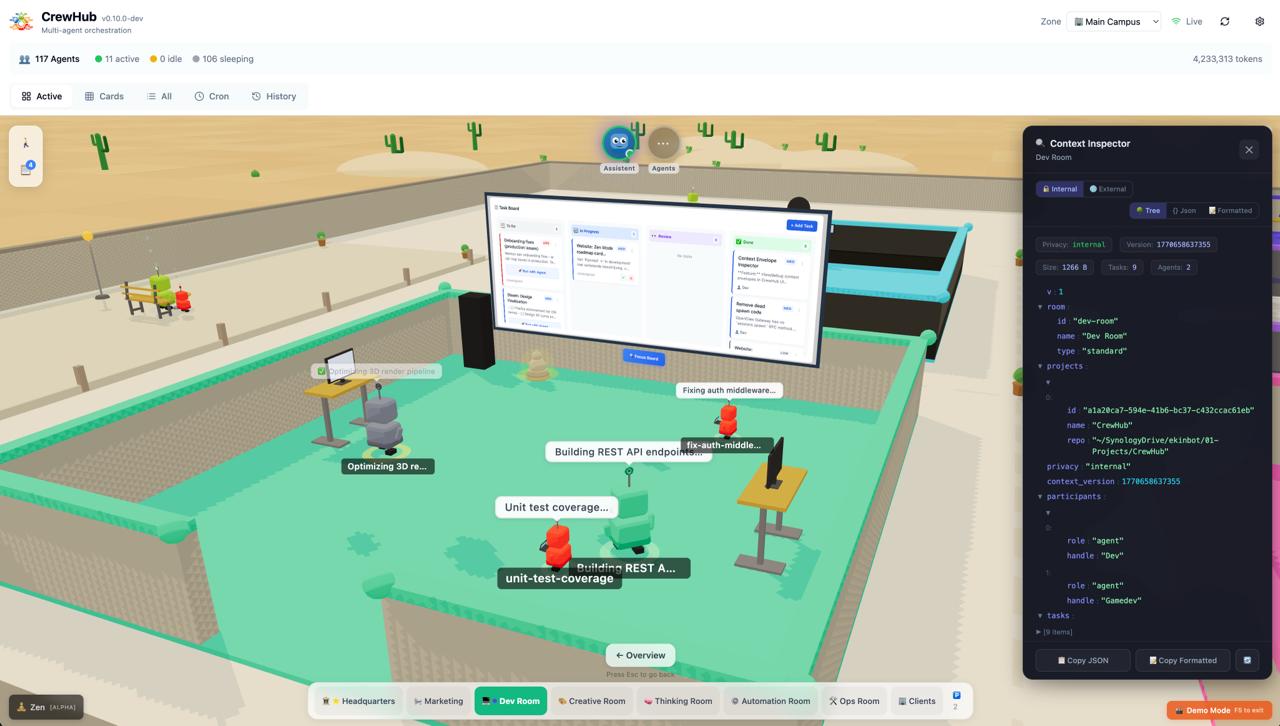
The Context Inspector in action. The left shows the 3D world (Dev Room with active bots working on tasks). The right panel displays the context envelope in Tree view — you can see the room details, CrewHub project, 9 active tasks, and 2 participants (Dev and Gamedev agents). Switch between Tree, JSON, and Formatted views, toggle between Internal/External privacy tiers, and copy the envelope to clipboard. Auto-refreshes every 10 seconds.
Try It Yourself
Context envelopes are coming in CrewHub v0.12.0 (releasing soon). Once it’s live, try this:
- Create a room and assign it a project
- Add a few tasks to the task board
- Click the 🔍 button in the room panel to open the Context Inspector
- Explore the envelope — see what data the agents receive
- Click “Run with Agent” on one of the tasks
- Watch how the agent responds — it’ll reference the room, project, and other tasks naturally
The Context Inspector gives you transparency. You can see exactly what information agents have access to, toggle between internal/external views, and copy the envelope for debugging. It gets it because you can see what it gets.
That’s the power of context-aware bots. Less setup, more collaboration, smarter agents. It’s a small feature that makes a big difference.
Questions? Feedback? Join us on Discord or open an issue on GitHub.